
Peg Layout Creator
What players say
Peg Layout Creator offers a quiet blend of creativity and logic. Its strength lies in the direct link between placement and outcome: every peg and tool affects ball trajectory and scoring. The lack of time pressure and the ability to adjust between rounds make it accessible for players who enjoy planning over quick reactions. Those seeking fast action or fixed puzzle solutions may find it too open-ended, but for patient tinkerers it provides a satisfying loop of experimentation.
How to play
Board Design and Ball Physics
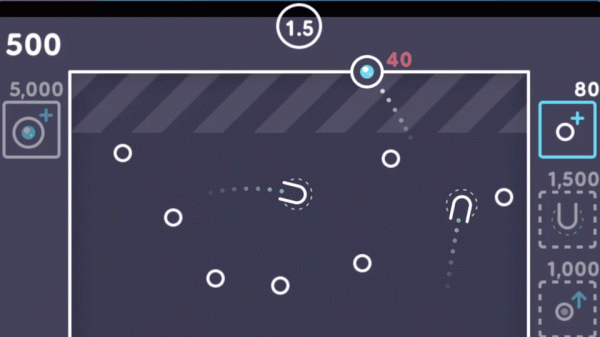
Peg Layout Creator starts with an empty grid. You drag pegs and utility items from an inventory onto the board, positioning them to influence the path of a bouncing ball. The ball moves with realistic momentum, ricocheting off pegs at angles set by their placement. A well-placed peg can redirect the ball toward a cluster of others, triggering rapid point gains. Tools like multi-ball launchers or score multipliers activate only when the ball passes through specific zones, so their usefulness depends on how you arrange the board around them.
Scoring Through Placement
Every peg struck adds to your score, and the arrangement you choose directly shapes how points accumulate. Dense clusters produce many small hits, while spaced-out pegs create longer, sweeping paths that may reach multiplier zones. Because activation depends on ball movement, thoughtful placement matters more than random scattering. There are no time limits, so you can think through each decision carefully before launching the ball.
Iterative Experimentation
The game does not impose a single correct board layout. Between rounds, you can adjust peg positions, add new tools, or remove underperforming elements. This iterative process lets you test different configurations and gradually improve your results. Some players prefer compact clusters for consistent hits; others aim for long paths that chain through multiple scoring zones. The lack of a fixed solution keeps the experience open to creative approaches.
Presentation and Pace
The interface uses clean, uncluttered graphics with soft colors, and each peg hit produces a subtle sound effect that reinforces feedback without becoming distracting. Smooth physics animations make bounces and tool activations visually satisfying. Combined with the absence of time pressure, this creates a calm environment suitable for short breaks or longer sessions. The basic mechanics are simple to grasp, but optimizing a board requires planning around peg density, tool placement, and launch angle.
Compatibility
FAQ
Comments
Sign in to comment
You must be logged in before posting a review or rating.
No comments yet. Be the first to comment!




Editorial Notes