
Brew & Balance: Tea Stand Tycoon
What players say
Brew & Balance: Tea Stand Tycoon focuses on drink assembly and supply management rather than fast-paced action. Its strengths lie in clear order-matching, gradual upgrades, and daily tasks that introduce new recipes. The resource planning aspect offers practical number practice for younger players. The main limitation is that the pace may feel too slow for those seeking a challenge. It suits casual players who enjoy crafting and light strategy.
How to play
Running the Tea Counter
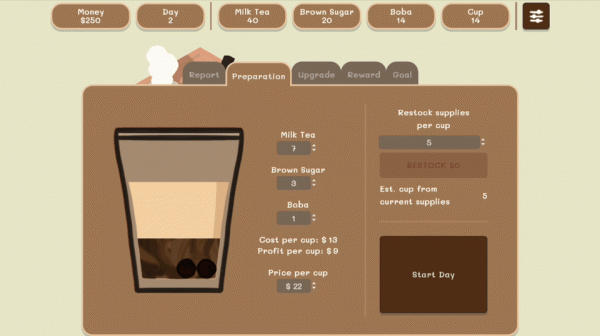
You begin with a simple counter and a small set of ingredients. During each shift, customers place orders that specify a tea base, sweetness level, and optional additions such as milk or fruit pieces. Your job is to assemble the drink by dragging ingredients into a cup and serving it before the customer loses patience. Completed orders add to your earnings, which you can spend on supplies or stand improvements. The early pace is deliberately gentle, giving new players room to learn the order system without time pressure.
Matching Customer Preferences
Every customer has a distinct preference. One might ask for light sweetness, another for extra milk, and a third for fruit pieces. The interface lets you combine tea bases, sweeteners, and toppings by dragging them into a cup. Getting the order exactly right keeps customers happy and protects your reputation. Mistakes reduce tips and make return visits less likely, so careful reading of each request matters more than speed alone.
Upgrading Equipment and Decor
As earnings accumulate, you can invest in faster equipment such as improved blenders or larger coolers. These upgrades shorten preparation time and help you handle busy periods without falling behind. You can also add decorations like small plants or cozy seating. A nicer-looking stand attracts more visitors, which raises daily income and gives you more room to experiment with new drink combinations.
Daily Tasks and Inventory Planning
Each day brings a new task, such as serving a set number of customers or using a specific ingredient combination. Completing these tasks unlocks special recipes and unique decorations. Meanwhile, you must monitor how much tea, sugar, and milk remain and order new stock before supplies run out. This supply oversight teaches basic resource planning and number skills, making the game a practical introduction to business concepts for younger players.
Compatibility
FAQ
Comments
Sign in to comment
You must be logged in before posting a review or rating.
No comments yet. Be the first to comment!
Editorial Notes