
City Streets: Rapid Response Navigation
What players say
City Streets: Rapid Response Navigation is a straightforward arcade driving game with a clear hook: dodge falling objects while steering through a city. The blue safe zones and the option to make objects collide add a strategic layer beyond pure reaction. Controls work on desktop and mobile, and the difficulty ramps up gradually. Its lack of violent content makes it suitable for families, though players seeking deep simulation or story will find it simple.
How to play
Steering Through a Falling-Object City
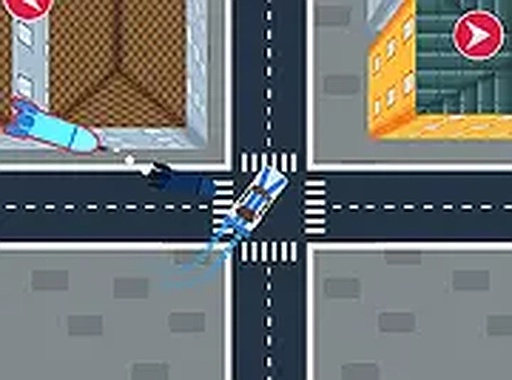
City Streets: Rapid Response Navigation puts you behind the wheel of a car moving through a city environment. Your job is to keep the vehicle on the road while objects drop from above. The setting includes buildings and streets that form the backdrop, but the real pressure comes from the falling items. You need steady control and quick decisions because the road does not pause for you.
Blue Safe Zones and Collision Tactics
Blue markers appear along the road and act as temporary safe zones. Driving over one gives you a short window of protection from falling objects. This turns route planning into a real choice: do you swerve toward a blue marker now, or save it for a tighter moment? A second tactic is to position your car so that falling objects hit each other and are removed from the road. That requires timing and spatial awareness, and it rewards players who read the pattern of drops rather than just reacting.
Controls on Desktop and Mobile
On a computer, you steer with the keyboard arrow keys. On phones or tablets, touch controls let you tap and swipe to direct the car. A full-screen option is available for a larger view. The inputs are simple enough for a new player to understand quickly, but the game keeps adding pressure so that experienced players still have to concentrate.
How Difficulty Builds
As you progress, falling objects appear more often and in more varieties. Safe zones become less frequent, and the timing window for making objects collide gets narrower. The ramp-up is gradual, so the challenge grows without turning into a wall. Players who stick with it can improve their reaction speed and their ability to plan a route under pressure.
Who This Game Suits
There is no violent or mature content here. The focus is on reflex-based driving and strategic planning, not combat or destruction. That makes it a reasonable choice for families looking for a quick-thinking online activity that builds hand-eye coordination. If you enjoy arcade driving with a light puzzle layer, the blue-zone and object-collision mechanics give you something to think about beyond simple dodging.
Compatibility
FAQ
Comments
Sign in to comment
You must be logged in before posting a review or rating.
No comments yet. Be the first to comment!




Editorial Notes