
Sunny Day Fashion Studio
What players say
Sunny Day Fashion Studio offers a focused styling experience built around two characters, several clothing categories, and optional accessories and makeup. The undo button and save-or-share options give the activity a clear structure, making it easy for younger players to experiment without pressure. The warm-weather wardrobe and age-appropriate makeup keep the tone light. It is best suited to casual players and children who enjoy dress-up games, though anyone seeking complex fashion simulation or competitive elements will find it limited.
How to play
Styling Two Friends
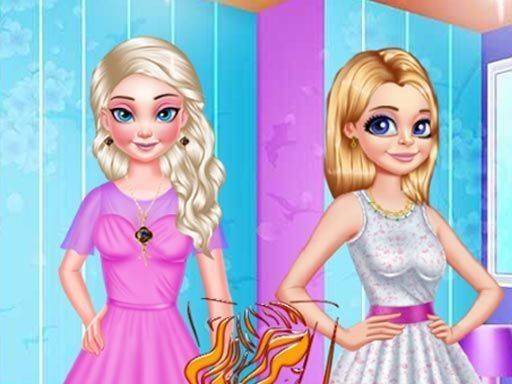
Sunny Day Fashion Studio begins with a simple choice: pick one of two friends to style first. Each character acts as a blank canvas, so players can approach the pair independently or plan coordinated and contrasting looks. The selection process is straightforward, allowing even young players to start without confusion. After finishing one outfit, players move to the second character, which encourages thinking about how the two styles relate to each other. This two-character structure gives the game a natural sense of completion and makes the styling process feel purposeful rather than open-ended.
Mixing and Matching Clothes
The wardrobe is divided into several categories, including tops, bottoms, full dresses, and footwear. Each category holds a range of colors and patterns that fit a warm-weather theme. Clicking on an item places it on the character immediately, so players see how pieces work together before committing to a final look. That instant feedback turns outfit building into a process of trial and adjustment rather than a guessing game. Because dresses are a separate category from tops and bottoms, players can choose between combining separates or selecting a single-piece outfit, which adds a small but meaningful decision to each styling session.
Accessories and Makeup
Beyond clothing, the game offers accessories such as headwear, eyewear, and decorative items. These details let players personalize an outfit and shift its overall feel, whether they want something playful or more polished. Makeup options, including lip color and eye shadow, are also available for players who enjoy extra detail. The makeup section is designed to be age-appropriate and focuses on color coordination rather than realistic application. Together, accessories and makeup encourage players to think about how small choices complement the main clothing rather than just piling on items.
Undo, Save, and Share
An undo button removes the last item added, which makes it easy to experiment without starting over. This is a practical feature for younger players who may change their minds often or want to compare two options quickly. Once both characters are styled to the player's satisfaction, the game provides options to save the final look or share it with others. Saving and sharing give the activity a clear endpoint and a sense of accomplishment, turning a casual styling session into something players can return to or show off.
Compatibility
FAQ
Comments
Sign in to comment
You must be logged in before posting a review or rating.
No comments yet. Be the first to comment!

Editorial Notes